

OpenAI launches ChatGPT Translate to challenge Google for the crown in the online translator market
ChatGPT Translate can be used without creating an account on the platform, making it easier for more users to adopt
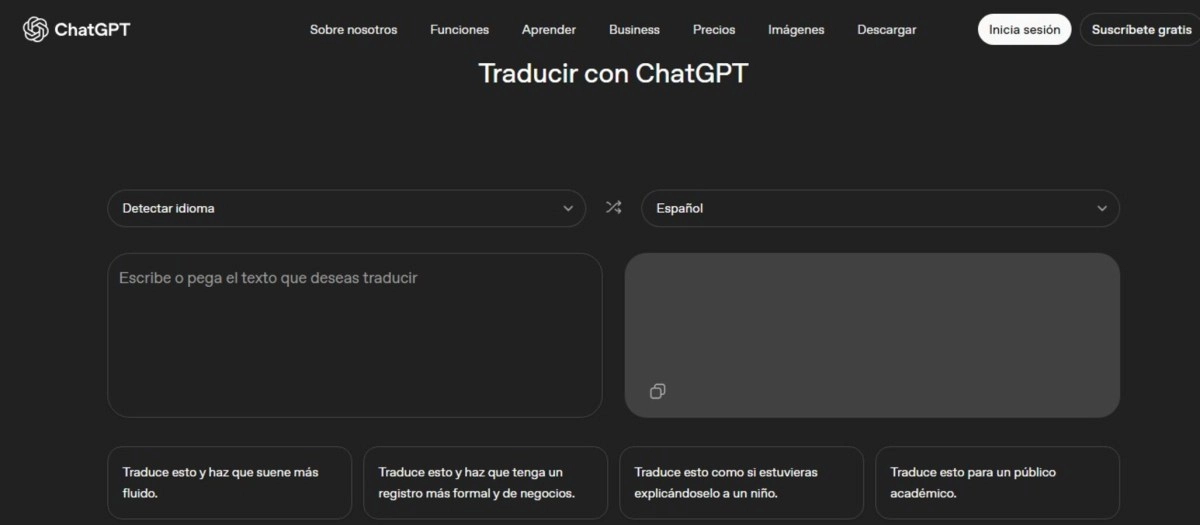

ChatGPT Translate is OpenAI's latest move to seriously compete with Google Translate: a web-based translator with a two-column interface that focuses on more natural translations and tone adjustment. And the most striking hook: it can be used without registering, so it's literally just opening the page and translating.
What is ChatGPT Translate and why does it matter?
OpenAI launched ChatGPT Translate as a standalone web-based translation tool, separate from the main chat, in a move intended to make translation a widespread, everyday use, not just "another feature" within ChatGPT. The offering comes with a very familiar look: input panel on the left, output panel on the right, menus for choosing languages, and automatic language detection when you paste text.
On paper, ChatGPT Translate supports more than 50 languages, and several media outlets agree that the idea is to compete directly with Google Translate (and also DeepL) in the quick use of "copy and paste." The difference lies in the approach: OpenAI is selling translation as something that understands tone, idioms, and context, with the option to request a more formal, more fluent, more academic, or simpler result.
The key: translation without register (and with tone)
For those who need to translate something now—an email, a paragraph for a document, a WhatsApp reply—the strong point is that ChatGPT Translate doesn't require an account to use, which simplifies the experience and puts it in "on-the-go" mode, like Google Translate. Furthermore, it's described as a free service accessible from the web, without needing to pay for a ChatGPT subscription to get started.
ChatGPT Translate doesn't just translate; it also encourages you to adjust it as if it were a guided rewrite. In several cases, by choosing style presets (for example, "more business formal" or "more fluent"), The flow can take you to the full ChatGPT interface to further refine the text with instructions, just like a conversation.
This is a shift in mindset from the classic “input-output” model: here, translation becomes iterative, more like editing with an assistant than using a rigid translator. For content creators, students, or professionals, this extra feature can be invaluable: literal translation is not the same as translating to sound natural in the target language.
Can it dethrone Google Translate?
Today, the reality is that ChatGPT Translate still feels a bit “green” in some features compared to the Google Translate ecosystem. For example, Engadget points out that, although the site claims to support text, voice, and images, there is no voice input on desktop yet, and there is no way to upload images for translation. It's also noted that there's no dedicated app, which immediately leaves out something key for travelers: offline use. This launch demonstrates that OpenAI wants you to translate quickly, yes, but also for the result to sound the way you need it to (formal, casual, academic, for children, etc.). And if the goal is to dethrone Google Translate, the path will probably not be to outdo it in the number of buttons or camera tricks, but in something more subtle: making the translation sound effortless, and allowing you to shape it in seconds.